
Last updated: June 2 2026 | For users, engineers, OEM buyers and maintenance teams working with 18650 lithium-ion battery packs.
Quick Answer: What Should You Check First?
If your 18650 battery pack will not charge, drains too fast, overheats, or has no output, check the charger, pack voltage, cell balance, wiring, connector condition and Battery Management System first. Most 18650 pack failures are caused by weak cells, loose connections, charger mismatch, BMS protection, over-discharge, excessive load or aging cells.
Stop using the pack immediately if you notice swelling, smoke, burning smell, melted wires, water damage or abnormal heat.
Safety First
18650 lithium-ion battery packs store high energy. Do not puncture cells, bypass protection circuits, short terminals, repair swollen cells, or continue using a pack that smells burnt or becomes unusually hot. If you are not trained to work with lithium battery packs, contact a qualified technician or replace the pack.
18650 Battery Pack Troubleshooting Matrix
Use this quick matrix to identify the most likely cause before taking apart a battery pack. It is designed for fast diagnosis and works better for search intent than a long list of separate problems.
Common 18650 Battery Pack Problems
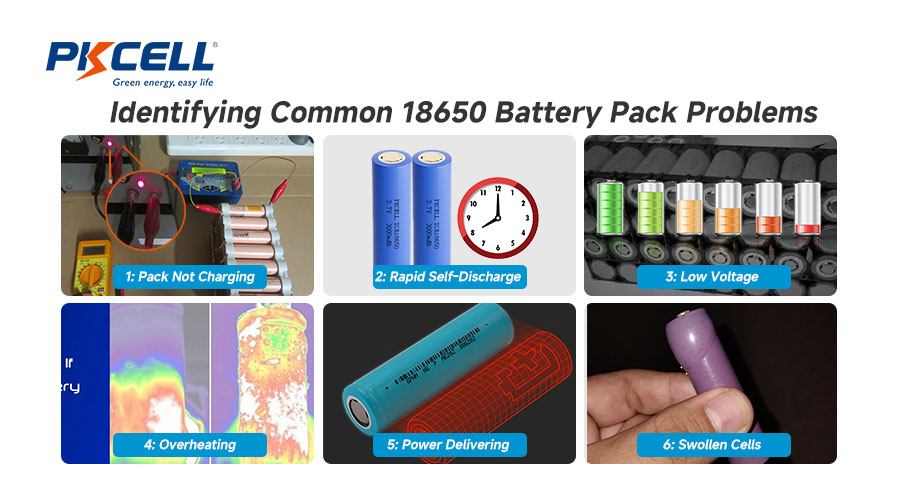
1. Battery Pack Not Charging
A pack that will not charge is one of the most common 18650 battery pack problems. The issue may be outside the pack, such as a faulty charger, or inside the pack, such as a failed BMS or over-discharged cell group.
- Check the charger: Confirm that the charger voltage and current match the pack specification.
- Check the charging port: Look for loose contacts, corrosion, damaged wires or melted plastic.
- Measure pack voltage: A pack that is far below its normal voltage range may have entered protection mode.
- Check the BMS: Some packs stop charging when the BMS detects over-discharge, overcurrent or cell imbalance.
2. Rapid Self-Discharge
If a battery pack charges normally but loses power quickly, the cause is often cell aging, imbalance or hidden current draw from the device.
- Compare the voltage of each cell group after full charge and after rest.
- Check whether the device still consumes current when switched off.
- Look for one cell group that drops faster than the others.
- Replace the pack if capacity has dropped significantly or cell groups are no longer balanced.
3. Low Voltage or Poor Runtime
Poor runtime usually means the pack no longer delivers its rated capacity. This may come from high internal resistance, old cells, poor welding, low-grade cells or a BMS that cuts off power early.
Important: A battery pack can show normal voltage with no load but still fail under load. For real diagnosis, check voltage drop while the device is operating.
4. Overheating During Charging or Use
Heat is a warning sign. A warm pack under heavy load may be normal, but a pack that becomes hot quickly, smells burnt, melts insulation or shuts down repeatedly should be removed from service.
- Check whether the device current exceeds the pack rating.
- Verify charger compatibility.
- Inspect whether the pack is enclosed without ventilation.
- Do not continue using a pack with signs of internal short circuit.
5. No Output from the Battery Pack
A charged 18650 battery pack may still provide no output if the BMS is in protection mode, the fuse is blown, or a connection inside the pack has failed.
- Measure voltage at the pack terminals.
- Check whether output returns after disconnecting the load.
- Inspect connectors, wires and fuse condition.
- If the BMS repeatedly shuts down under normal load, the pack design may not match the application.
6. Swollen, Leaking or Damaged Cells
Swelling, leaking, smoke, corrosion or chemical odor means the pack is unsafe. Do not charge, repair or reuse the pack. Move it away from flammable materials if safe to do so and follow local battery recycling rules.
How to Tell if the BMS Is Causing the Problem
The Battery Management System protects lithium-ion packs from overcharge, over-discharge, overcurrent, short circuit and overheating. Many users replace cells first, but the real fault may be the BMS or its wiring.
Should You Repair or Replace the 18650 Battery Pack?
Not every battery pack should be repaired. For safety-critical applications, replacement is often the better choice.
Repair May Be Possible If
- The charger or connector is faulty, not the cells.
- Only a loose wire or external connection is affected.
- The pack uses a serviceable design and there is no swelling, burning or leakage.
- A qualified technician can test cells, BMS and wiring safely.
Replace the Pack If
- Cells are swollen, leaking, rusty or physically damaged.
- The pack overheats during normal charging or use.
- Multiple cell groups are weak or imbalanced.
- The pack has water damage, burn marks or melted wires.
- The battery is used in medical, safety, industrial or high-current equipment.
Battery Pack Inspection Checklist
Common Devices Using 18650 Battery Packs
Many 18650 pack failures are application-related. A pack designed for low-drain electronics may fail quickly if used in high-current devices.
18650 Battery Pack Issues in OEM and Industrial Applications
For OEM projects, battery pack failure is often caused by design mismatch rather than user error. A battery pack must match the device’s current draw, charging system, enclosure, operating temperature and expected runtime.
- Cell matching: Inconsistent cells can lead to imbalance and early shutdown.
- BMS configuration: A BMS with incorrect current or voltage limits may trigger protection too early or too late.
- Connector quality: Poor connectors increase resistance and heat.
- Thermal design: Enclosed devices require heat management.
- Charging compatibility: Charger and pack design must match voltage, current and chemistry.
Need a More Reliable 18650 Battery Pack?
PKCELL provides rechargeable lithium battery and custom battery pack solutions for industrial devices, medical equipment, smart devices, security systems, power tools, lighting products and portable electronics. For OEM projects, PKCELL can support battery selection, pack design, connector options, voltage and capacity requirements, labeling and export documentation.
Best fit: 3.7V, 7.4V, 11.1V, 14.8V and custom 18650 lithium-ion battery pack projects.
Maintenance Tips to Extend 18650 Battery Pack Lifespan
- Use a charger designed for the correct lithium-ion battery pack voltage and chemistry.
- Avoid storing packs fully discharged or fully charged for long periods.
- Keep packs away from extreme heat, moisture and direct sunlight.
- Do not exceed the pack’s discharge current rating.
- Inspect connectors, wires and casing regularly.
- Replace aging packs before they fail in critical equipment.
FAQ
Conclusion
Most 18650 battery pack problems can be traced to charger mismatch, BMS protection, weak cells, loose wiring, overheating or poor pack design. The safest troubleshooting approach is to start with visual inspection, charger verification and voltage checks, then decide whether repair or replacement is appropriate.
For OEM and industrial projects, preventing failure is better than fixing it later. Choosing matched cells, correct BMS settings, reliable connectors and a battery pack manufacturer with application experience can significantly improve long-term safety and reliability.
Post time: Jul-31-2025


